
Download AutoUP – Free, Secure Application Update Tool for Windows
AutoUP is a lightweight, no-installation-required software designed for Windows users who want to keep their applications updated with minimal effort. This powerful yet simple tool scans your system for outdated programs like Chrome, Skype, WinRAR, CCleaner, and Adobe Reader, checks for newer versions, and provides direct download links. With AutoUP, you can eliminate the hassle of manually searching for updates across multiple websites. The app also features a 'Software' tab for downloading new programs and a 'System' tab to view hardware and OS details—making it a complete system maintenance companion. Whether you're a home user or managing a small office setup, AutoUP delivers a fast, secure, and intuitive update experience.
Effortless Application Updates with AutoUP
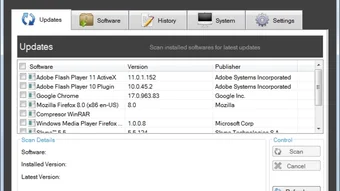
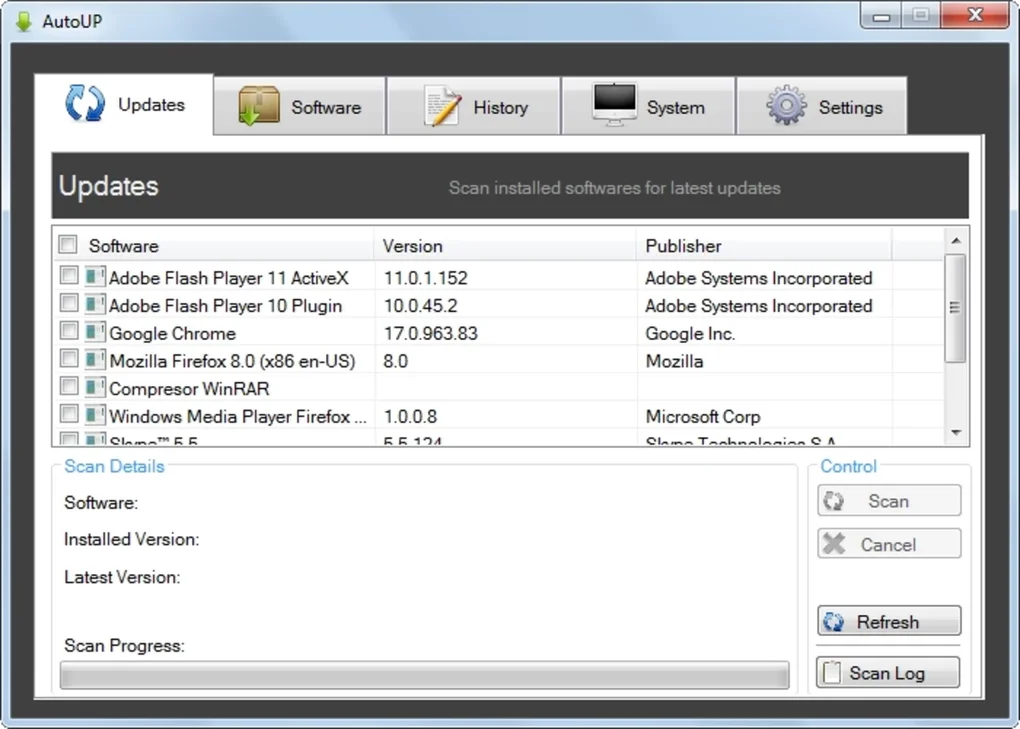
One of the standout features of AutoUP is its ability to streamline the often tedious process of updating software. Instead of opening each application, navigating to their official websites, and checking for updates, AutoUP performs a comprehensive scan of your installed programs in seconds. The tool automatically detects a wide range of commonly used applications, including essential tools like Google Chrome, Microsoft Edge, Adobe Reader, WinRAR, and Skype. Once the scan is complete, AutoUP displays a clear list showing the current version of each app and whether an update is available.
What sets AutoUP apart is its user-friendly interface. You don’t need technical knowledge to operate it—just launch the app, click “Scan,” and wait. The results are presented in a clean, easy-to-read format with color-coded indicators: green for up-to-date, yellow for available updates, and red for critical updates. You can then select one or multiple apps to update, and AutoUP provides direct download links, eliminating the risk of downloading from unofficial or potentially harmful sources. This not only saves time but also enhances security by ensuring you're getting the official version from trusted sites.
Moreover, AutoUP supports automatic update checks and can be scheduled to run at regular intervals, helping you stay proactive about software maintenance. For users who frequently install new software, the 'Software' tab offers a curated list of popular programs with one-click download options. This makes AutoUP not just an update tool, but a complete software management assistant that keeps your system running smoothly and securely.
Simple Installation & Intuitive Usage for All Users
AutoUP stands out in the crowded software update market because it requires no installation. Simply download the portable .exe file from the official website, extract it (if needed), and run the application directly. This makes it ideal for users who prefer portable tools that don’t leave traces on the system or require admin rights. Whether you're using a personal laptop, a work computer, or a shared device, AutoUP can be run from a USB drive or desktop folder without any setup hassles.
Upon launching, the interface is clean and intuitive, with clearly labeled tabs: 'Applications,' 'Software,' and 'System.' The 'Applications' tab is where the magic happens—scan your system, view outdated software, and update with a single click. The 'Software' tab functions as a lightweight app store, offering quick access to popular programs like VLC Media Player, 7-Zip, and Notepad++. Each entry includes a brief description and a direct download link. The 'System' tab provides detailed information about your hardware, including CPU, RAM, GPU, and OS version, which is useful for troubleshooting or checking compatibility before installing new software.
For first-time users, AutoUP includes a brief onboarding guide that walks you through each feature. You can also customize update preferences, such as enabling notifications for new updates or choosing which applications to monitor. The tool runs in the background with minimal system resource usage, so it won’t slow down your computer. With its straightforward workflow and minimal learning curve, AutoUP is perfect for both beginners and experienced users who want a hassle-free update experience.
Compatibility, Security & Key Features
AutoUP is designed specifically for Windows operating systems, supporting Windows 7, 8, 8.1, and 10 (both 32-bit and 64-bit versions). It does not currently support Mac, Android, or iOS, but its focus on Windows ensures a stable and optimized experience. The tool is fully compatible with modern Windows environments and works seamlessly with UAC (User Account Control), meaning you can run it even on restricted user accounts.
Security is a top priority. AutoUP only fetches update information from official sources and provides verified download links. It does not modify system files or registry entries, reducing the risk of unintended side effects. All communication with update servers is encrypted, and the app does not collect personal data—ensuring your privacy remains intact. The portable nature of the tool also means it can be used on public or shared computers without leaving behind sensitive information.
Key features include:
- Instant System Scan – Detects outdated applications in seconds.
- Direct Download Links – Access official update files without visiting multiple websites.
- Portable & No Installation – Run from USB or desktop without setup.
- Software & System Information Tabs – One-stop access to app downloads and system diagnostics.
- Update Scheduling – Set automatic scans to stay up-to-date automatically.
- Lightweight & Fast – Minimal CPU and memory usage.
These features combine to make AutoUP a reliable, efficient, and secure solution for maintaining your software ecosystem.
Pros & Cons: Is AutoUP Right for You?
Before downloading, it’s helpful to understand the strengths and limitations of AutoUP.
Pros:
- Zero Installation Required – Perfect for users who avoid installing software.
- Fast and Lightweight – Minimal impact on system performance.
- Secure Update Links – Reduces risk of malware from fake downloads.
- Comprehensive App Detection – Recognizes popular tools like Chrome, Skype, and Adobe Reader.
- Additional Utilities – Includes system info and software download tabs.
Cons:
- Windows-Only – Not available for Mac, Android, or iOS users.
- No Automatic Update Installation – You must manually download and install updates.
- Limited Customization – Few advanced settings for power users.
Frequently Asked Questions (FAQ)
Is AutoUP safe to download and use?
Yes, AutoUP is safe. It is a portable tool that doesn’t install any components on your system. It only retrieves update information from official sources and provides verified download links. The app does not collect personal data or modify system files, making it a secure choice for Windows users.
Can I use AutoUP on a work or school computer?
Absolutely. Since AutoUP doesn’t require installation and runs from a folder or USB drive, it’s ideal for environments with strict software policies. It won’t trigger antivirus alerts and won’t leave traces on the system after use.
Does AutoUP update applications automatically?
No, AutoUP does not automatically install updates. It scans your system and provides direct download links. You must manually download and run the installer. However, you can schedule scans to stay informed about updates regularly.
What types of software does AutoUP detect?
AutoUP detects popular applications such as Google Chrome, Mozilla Firefox, Skype, WinRAR, CCleaner, Adobe Reader, VLC Media Player, and 7-Zip. It supports both common utilities and productivity tools used by everyday users.
Can I download new software using AutoUP?
Yes, the 'Software' tab allows you to browse and download popular programs directly from the app. It’s a convenient alternative to searching the web for trusted download links.
Final Verdict: A Must-Have Tool for Windows Users
AutoUP is a reliable, secure, and efficient application update tool that simplifies software maintenance for Windows users. With its no-installation design, fast scanning, and direct download links, it eliminates the frustration of manual updates. Whether you're a casual user or managing multiple devices, AutoUP helps you stay current without compromising security or performance.
While it doesn’t support automatic installation or other operating systems, its strengths far outweigh its limitations. For anyone looking to save time, reduce update-related risks, and keep their system optimized, AutoUP is a smart choice. Download it today and enjoy a cleaner, safer, and more up-to-date computing experience.
Download AutoUP now and take control of your software updates—free, secure, and hassle-free.







